Lightweight Windows downloader for high-resolution video and audio extraction
Downloads and converts YouTube and other video-site content into MP4, MKV, MP3, and FLAC with drag-and-drop links and an integrated history. Created by Havy Alegria, this Windows video utility targets users who need direct access to Ultra HD 4K and 8K sources. Key capabilities include resolution selection up to 8K, format conversion, and a multilingual interface. It fits creators and viewers who want fast, dedicated offline copies without an editing suite.
Top Recommended Alternative

What the tool does and how it fits a creative workflow
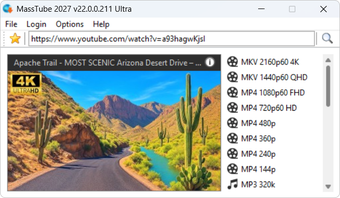
The app grabs online video URLs, queues downloads, and converts files to chosen container and audio formats. It accepts pasted or dragged links, maintains a history of processed items, and produces output usable on other devices. For creators who collect reference footage or repurpose audio, the workflow focuses on capture and extraction rather than timeline editing or compositing.
What video and audio formats it handles
Format support covers common containers and extracted audio: MP4 and MKV for video, MP3 and FLAC for audio, plus OGG and AAC noted in developer notes. The app supports resolutions from low quality up to Ultra HD 4K and 8K, so exports can match the original upload resolution when available.
How the interface and workflow affect onboarding
Minimalist UI presents a single window for link input, quality selection, and conversion options, which keeps the learning curve short. Multilanguage menus reduce friction for non-English users. The history manager gives a quick way to re-process recent URLs. Although the interface avoids complex controls, it does not provide an editing timeline or audio mixer, so post-download adjustments must occur in other software.
Performance with large files and expected output quality
Performance aims for low resource use, with a small system footprint and fast handling of high-resolution streams. The developer maintains compatibility updates to follow streaming protocol changes, which preserves the app's ability to retrieve current sources. Exported files retain the original resolution and typical codec quality when the chosen format supports it.
Recommended for collectors and creators who need fast, no-frills downloads
The app suits Windows users who need reliable capture and format conversion of high-resolution videos without a built-in editor. Although it omits timeline editing and advanced audio tools, it excels at quick extraction of Ultra HD sources and straightforward audio exports, making it a practical tool for assembling raw assets before moving to a full editor.